Perfect365 Makeup Photo Editor: virtual makeovers and portrait retouching
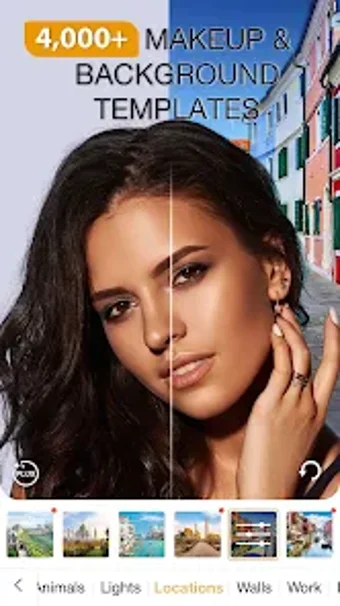
Perfect365 Makeup Photo Editor, by Perfect365 Inc., is a virtual glam squad for photo retouching and beauty experimentation. The app applies AR and AI facial tracking to overlay makeup, change hair color, and perform skin smoothing, blemish removal, and teeth whitening on still images instantly. It offers over 200 one-tap Hotstyles, 3,000 preset looks, a Pro Color Palette, and direct social sharing for quick posting. Made for selfie fans, beauty creators, and makeup artists who need fast visual experiments before real-world application.
How precise is the app's facial mapping?
The developer's proprietary Intelligent Imaging technology powers the face-detection system and aims to place effects with high accuracy. The engine identifies facial landmarks and adapts to small head tilt and expression changes, so contouring and eyeliner maintain alignment during minor movement. Skin retouch tools work on targeted zones rather than a blanket blur, preserving natural texture while addressing blemishes for portrait-focused edits.
What platforms and setup does it support?
Perfect365 runs on Android (requires version 8.0 or higher), is available on iOS, and offers a web-based editor that opens in standard browsers. The company originated from an ArcSoft spin-off and reports its imaging technology is integrated into many smartphones, which explains broad device-level compatibility. Camera access and browser support enable quick imports from device galleries and direct editing inside the app or the web editor.
Is it practical for creators who test real products?
Perfect365 partners with beauty brands and makeup artists so users can preview specific product shades within the editor, a practical aid for creators and professionals planning looks. The Android distribution exceeds 100 million downloads and user feedback highlights realistic filters and accessible retouching. An account-gated PLUS tier unlocks ad-free use, HD saving, and premium looks for users aiming for higher-resolution exports and exclusive presets.
How does it treat facial data and device integration?
The editor processes facial landmarks and imaging data to position makeup and hair changes precisely, reflecting the developer's focus on facial recognition and imaging. That specialization supports camera-level integration across mobile and web editors and informs brand partnerships. The app operates on face-derived data for AR placement and visual retouching, making facial feature processing central to the editing workflow rather than incidental metadata handling.
To sum up, Perfect365 fits photo-based creators but fragments moving-content workflows
To sum up, Perfect365 is a practical option for social creators and beauty professionals who want rapid, photo-based makeup trials and visual planning. One limitation is that video makeup requires a separate app, which fragments moving-content workflows. It fits well into daily routines focused on creating polished still portraits and planning real-world looks from a mobile device. Tip: preview shades under natural light before saving.